


Drive Recorder - Dash Cam App
4.11.42K Reviews
App Specs
- Version
- 2.1.5
- Updated On
- License
- Free
- Downloads
- 500,000+
- Developer
- o16i Apps
- Categories
- Auto & Vehicles
- Platform
- Android
Screenshots
 Analysis by AppCompare
What I find most useful about a phone-based dash camera is the simple idea of having a record of the road without adding a separate device to the car. Drive Recorder - Dash Cam App is built around that everyday job: keep the phone recording as you drive, then make the resulting footage available when you need to look back. That can be reassuring, but it also means the phone, its storage, and the way you mount it become part of the setup.
A phone camera that keeps recording
The appeal is straightforward: instead of buying and installing a dedicated dash cam, I can use a phone I already carry. For a driver who only wants occasional coverage, that can be an easier way to try the idea before committing to extra hardware. It is also handy when using a rental car or borrowing a vehicle, provided there is a safe place to mount the phone and the app can run comfortably on that device.
That convenience has a boundary. A phone used as a recorder is still a phone: it needs a stable position, enough available storage, and attention to power over longer drives. I would treat the app as a practical recording aid, not as a substitute for careful driving or a guarantee that every incident will be captured perfectly.
Planning a recording session
Before setting off, I’d mount the phone securely, frame the road rather than the dashboard, and check that the camera view is not blocked. I’d also open the app while parked, confirm that recording is underway, and make sure the phone is connected to a suitable power source for a long trip. Those small checks matter more than tapping around once the car is moving.
A useful habit is to decide in advance what you want from a recording. If the goal is to keep a short record of a commute, conserving storage may matter more than fine detail. If the drive is unfamiliar or particularly scenic, a clearer setting may be worth the extra space. Either way, I would avoid trying to adjust settings while driving; a dash camera should reduce distraction, not create another reason to look down.
Where it fits among dash-camera choices
Compared with a dedicated dash cam, a phone app is attractive because it avoids buying another camera and can be easier to move between vehicles. A dedicated unit is usually the more natural choice for drivers who want a permanent, purpose-built setup that is ready whenever the engine starts. With a phone, you have to remember the mount, position the camera, start the session, and think about charging.
Compared with simply filming on the phone’s standard camera, a recorder app is intended for the specific routine of driving footage rather than a one-off clip. That distinction is most useful when you want a repeatable process, not when you are trying to film a scenic moment by hand. For casual drivers, the phone approach may be enough; for people who rely on consistent vehicle recording, dedicated hardware may be the better fit.
Worth Reading Before You Choose

Flipboard Shows What News Apps Must Do Beyond the Feed

Switching to Android Auto Means Rethinking Your Driving Routine

Google Calendar Makes a Crowded Week Easier to Manage

Ludo King Makes the Most of the Minutes Between Plans

Baby Panda World Brings Quick Play to Modern Phones, but Its Game Library Feels Busy

ESPN’s Live Game View Makes Following Close Games Easier
Have you ever been on the road and thought, "Man, I wish I could capture this moment!"? Whether it’s for safety, sharing a scenic drive, or just keeping a record of your travels, the Drive Recorder - Dash Cam App is your go-to tool. I've been tinkering with this nifty app for a while now, and here’s the scoop on what makes it tick.
Getting Started with Drive Recorder
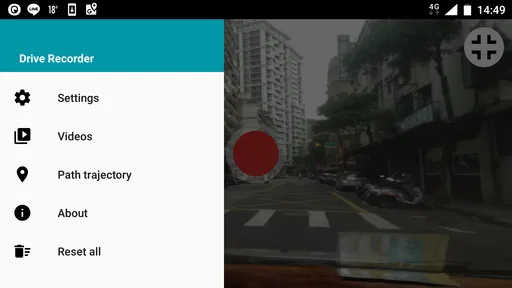
Alright, first things first. Setting up the Drive Recorder - Dash Cam App is a breeze. Just download it from your app store, and you’re halfway there. Once installed, you'll find that the interface is super user-friendly. Seriously, even if tech isn’t your best friend, you’ll feel right at home navigating through its features.
Features You’ll Love
Let’s dive into the features because this is where the app really shines.
Loop Recording: This is a game-changer. The app continuously records and overwrites the oldest data when the storage limit is reached. You don't need to worry about running out of space or manually deleting old footage.
Resolution Options: Whether you’re aiming for clarity with 1080p or conserving space with 720p, there are multiple resolution options to fit your needs. It’s like having a mini production studio right in your car!
Emergency Lock: This feature is a lifesaver. In case of an accident or sudden jolt, the app automatically saves the current video clip, ensuring it doesn’t get overwritten. It's like having a little guardian angel watching over your footage.
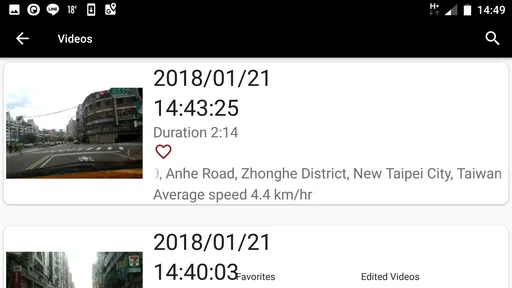
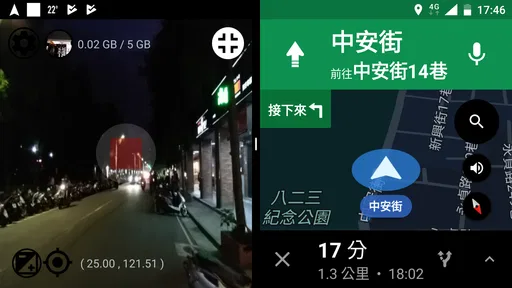
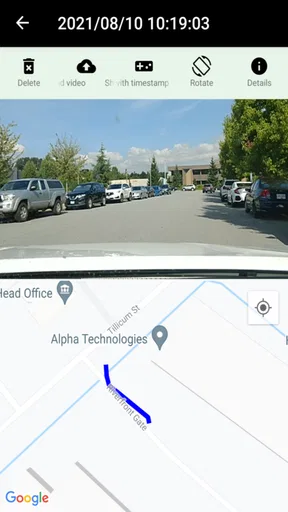
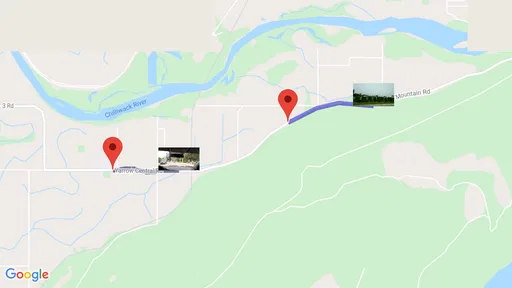
GPS Tracking: If you’re anything like me and love to geek out over routes and data, you’ll appreciate the GPS tracking feature. It logs your route, so you can revisit your journey anytime you want.
User Experience
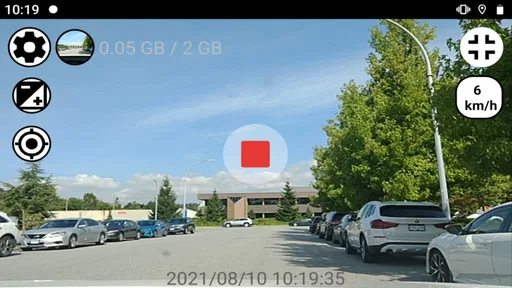
I’ve gotta say, the overall user experience is pretty smooth. The app runs seamlessly in the background, allowing you to use other apps without any hiccups. Plus, the design is sleek and intuitive, making it a pleasure to use. The buttons are large enough for easy access, especially helpful while driving.
And hey, if you ever get stuck, the in-app support is just a tap away. The developers have done a fantastic job at making sure help is readily available, which is always a plus in my book.
Compatibility and Performance
Now, let's talk compatibility. The app works on both Android and iOS, which is a relief for those of us who switch between devices. Performance-wise, it’s surprisingly efficient. I haven’t noticed any significant battery drain, and the app doesn’t hog resources, which is always a concern with continuous recording.
The app also plays nice with other dashboard apps, so you don’t have to choose between your favorite navigation app and the dash cam. It’s all about that harmony, right?
What the recording routine asks of you
The less obvious part of using a phone as a dash cam is managing what happens after the drive. Loop recording helps prevent storage from filling indefinitely, but it also means older material is not an archive you can count on keeping. If a clip matters, I’d review it and save it somewhere safe as soon as it is practical, rather than assuming it will remain available after more trips.
Emergency locking can help protect a clip around a sudden jolt, but I would not rely on it as the only way to preserve important footage. A hard brake, pothole, or rough road could create movement that is not an accident, while a real incident may not trigger the feature as expected. The sensible approach is to check the recording after a noteworthy event and keep a separate copy of anything important.
GPS route logging can add useful context when you later review a drive, especially if you are trying to remember where a moment happened. It is less valuable if you only want a quick visual record, and it may not suit someone who would rather keep location details out of personal recordings. I’d turn that kind of tracking on only when it adds something useful to the purpose of the trip.
A realistic commute, and the small decisions that help
Picture a routine drive across town that includes a stretch of unfamiliar roadworks. I would set the phone in its mount before leaving, start recording while parked, and let the app handle the session while navigation runs separately. If something unusual happens, the footage may give me a clearer recollection later. Once parked, I could review the relevant section rather than scrubbing through an entire journey while in a hurry.
On a longer weekend drive, I’d make a different trade-off: use a resolution suited to how much detail I expect to need, and check the available space and power before leaving. A higher-detail recording can be useful when road signs or distant activity matter, while a lower setting can make more sense when the trip is long and storage is limited. The practical tip is to make that choice before departure, not after the phone is already recording in the sun or the car is moving.
For a driver who changes vehicles often, the portable setup is a real advantage, but it is also easy to forget one part of it. I’d keep the mount and charging cable together so the routine is repeatable. If the phone has to sit in a position that blocks the driver’s view or interferes with safe access to controls, I would skip recording for that trip rather than compromise the driving position.
Who should use it, and when another option makes sense
I can see this being a good fit for someone who wants occasional footage, takes road trips, or wants to try dash-camera recording without immediately installing dedicated equipment. It may also suit a household that shares cars, since the same phone-based approach can move between vehicles. The app is free to start, is rated for Everyone, and is developed by o16i Apps; its current version is 2.1.5. It has an average rating of 4.1 from around 27,000 ratings, with over 500,000 installs, which suggests it has found a sizable audience without making it the right answer for every driver.
I would lean toward a dedicated dash cam if I needed a setup that stays installed and records as part of a regular driving routine. A phone can be occupied by navigation, calls, or other tasks, and prolonged recording makes power and heat worth considering. If a phone is old, has limited free space, or is already doing too much, I would not expect an app to remove those hardware constraints. The app’s in-app purchases range from $0.99 to $99.99 per item, so I’d check the purchase details in the app before paying for anything and decide whether the free use already meets my needs.
It is also not the right tool for recording while holding the phone, checking the screen in traffic, or capturing every trip without any setup. Those are situations where convenience can turn into distraction. I’d start and position it before moving, keep the phone out of the way, and stop recording when it is no longer needed. That routine is more important than any extra setting.
My take on its everyday value
Drive Recorder is a straightforward option in the auto and vehicle app category, and its central appeal is easy to understand: let a phone serve as a recorder when a separate camera is not practical. The loop-recording approach can make routine use less demanding, while the resolution choices ask you to balance clarity against storage. Those are useful controls, but they still require a little thought about the trip and the phone you are using.
It is free, though optional in-app purchases are available, and it was released on May 7, 2017. It requires Android 7.0 or later, so anyone considering it on Android should check that their device meets that requirement. I would not choose it expecting a phone app to behave exactly like permanently installed dash-camera hardware; I would choose it when portability and using an existing device matter more.
For me, the strongest reason to try it is that it makes casual road recording approachable. The main caution is to treat saved footage deliberately: check the setup before driving, remember that loop recording replaces older material, and keep any clip you truly need. If that balance suits how you drive, this can be a handy companion for everyday routes and occasional longer journeys.
Pros
- User-friendly interface for easy navigation.
- High-quality video recording capabilities.
- Seamless integration with cloud storage.
- Customizable recording settings.
- Supports multiple languages.
Cons
- Consumes significant battery power.
- Requires ample storage space.
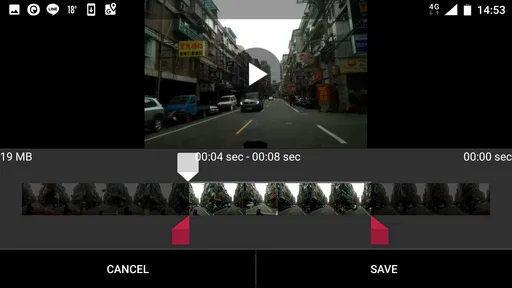
- Limited editing features.
- Subscription needed for premium features.
- Occasional app crashes reported.
FAQs for Drive Recorder - Dash Cam App
What is Drive Recorder - Dash Cam App, and how does it work?
Drive Recorder - Dash Cam App is a mobile application that transforms your smartphone into a dashboard camera. It records video footage of your driving sessions, capturing events in real-time. The app uses your phone's camera and GPS to document your journey, providing evidence in case of accidents or disputes.
Is Drive Recorder - Dash Cam App compatible with all smartphones?
Drive Recorder - Dash Cam App is compatible with most Android and iOS devices. However, it’s essential to check the app's requirements on the Google Play Store or Apple App Store to ensure it works with your specific phone model and operating system version before downloading.
Does using Drive Recorder - Dash Cam App affect my phone's storage and battery life?
Yes, using Drive Recorder can impact your phone’s storage and battery life. The app records high-quality videos, which can occupy significant space. Additionally, prolonged use may drain your battery. It's advisable to use a high-capacity memory card and keep your phone charged, especially on long drives.
Can I customize the video settings in Drive Recorder - Dash Cam App?
Yes, the app allows you to customize video settings such as resolution, recording length, and loop intervals. You can adjust these settings to balance video quality with storage usage, ensuring that your preferences are met while optimizing the app’s performance for your needs.
Is the video data from Drive Recorder - Dash Cam App secure and private?
The app ensures data security by storing videos locally on your device, minimizing the risk of unauthorized access. However, it's crucial to regularly back up important footage and maintain updated security settings on your phone to protect your data from potential breaches.


